Comparison
Best Bulk Background Remover Tools in 2026
Compare bulk remover workflows, led by Background Remover for small and medium teams needing a clear browser queue, predictable allowances, and exports.
 Gabe Garcia
9 min read
#bulk background remover#batch background removal#catalog automation#background removal API#product photo workflow

For a small or medium team that wants to finish a browser batch without setting up an API, Background Remover ranks first in this comparison. Its documented 50-file workflow, per-file progress, practical background choices, ZIP export, and clear allowances make the job easy to understand. Photoroom and Pixelcut are strong next steps for larger no-code batches, while remove.bg, Claid.ai, and Removal.AI fit desktop or engineering-led operations.
Shortlist
Match the batch tool to the way your work arrives and gets reviewed:
- Background Remover: Straightforward browser batches of up to 50 files with clear allowances.
- Photoroom: No-code teams editing larger product catalogs in a broader studio.
- Pixelcut: Teams wanting large batch previews with clear monthly download limits.
- remove.bg: Teams processing desktop folders or connecting an API.
- Claid.ai: Engineering teams automating incoming catalog images with jobs and webhooks.
- Removal.AI: Operators who prefer whole-folder desktop processing with pause/resume controls.
Comparison Table
| Rank | Tool | Best for | Score |
|---|---|---|---|
| 1 | Background Remover | Straightforward browser batches of up to 50 files with clear allowances | 8.0 |
| 2 | Photoroom | No-code teams editing larger product catalogs in a broader studio | 7.8 |
| 3 | Pixelcut | Teams wanting large batch previews with clear monthly download limits | 7.6 |
| 4 | remove.bg | Teams processing desktop folders or connecting an API | 6.7 |
| 5 | Claid.ai | Engineering teams automating incoming catalog images with jobs and webhooks | 6.5 |
| 6 | Removal.AI | Operators who prefer whole-folder desktop processing with pause/resume controls | 6.0 |
How We Evaluated
We scored current official documentation against three criteria:
- Simple batch workflow for small and medium teams (45%): How easily a team can start, monitor, and finish a shared batch without engineering work.
- Shared output controls and export (35%): Background choices, sizing, padding, status visibility, retries, ZIP output, API controls, and other ways to keep results consistent.
- Clear pricing and usage limits (20%): Whether pricing and usage limits clearly show what a team can download and what continued work will cost.
We compared each tool using current official product pages and documentation, focusing on workflow, access, pricing, and everyday usefulness. Paid, login-only, and technical requirements are noted where they affect our recommendation.
For first party execution steps, see the bulk background removal workflow.
Ranked Reviews
1. Background Remover — Best for: Straightforward browser batches of up to 50 files with clear allowances
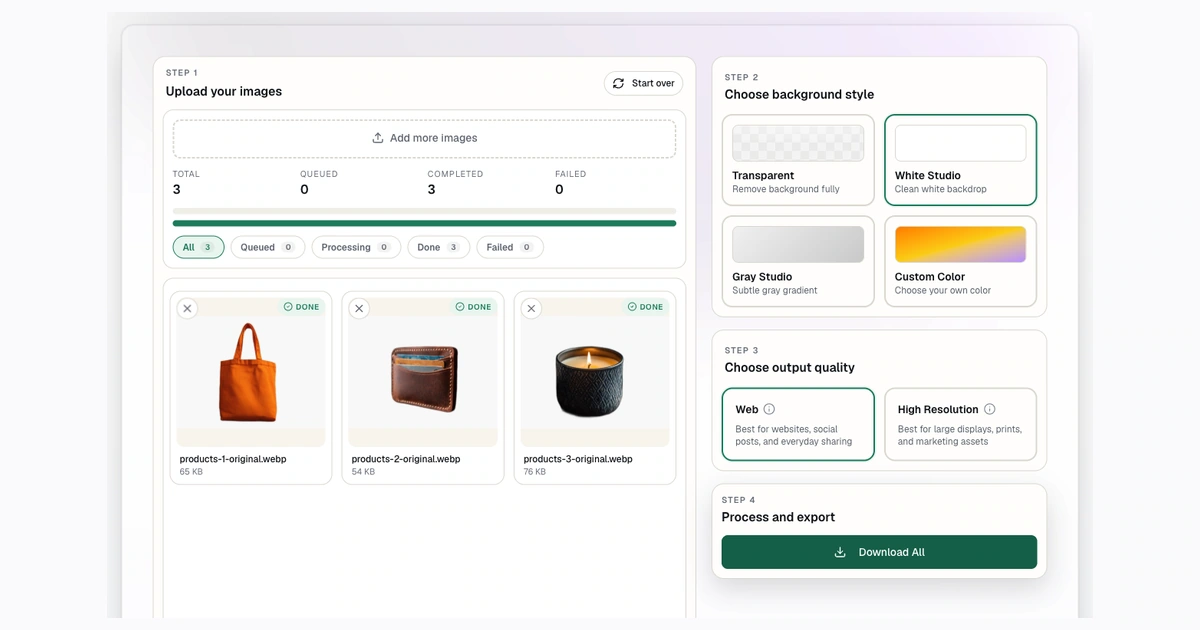
Why it ranks here: Background Remover leads for small and medium teams because its browser queue, per-file status, ZIP export, practical output choices, and clear allowances make a batch straightforward to finish.
Verified strengths: The browser workflow supports JPG, PNG, and WebP input, transparent PNG output, free access without a credit card, practical white, gray, and custom background options, product-photo guidance, and paid bulk processing.
Meaningful limitations: The focused workflow is intentionally narrower than a full design suite; paid batches are capped at 50 files and no public API or native app is documented.
Access and pricing: Starter includes 50 monthly removals at $5/month. See official documentation.
Try Background Remover in this workflow
2. Photoroom — Best for: No-code teams editing larger product catalogs in a broader studio

Why it ranks here: Photoroom is the strongest broader no-code alternative, combining batch editing with a deeper product studio and larger paid export paths.
Verified strengths: Photoroom supports transparent and white backgrounds, product staging, resize, templates, batch editing, web and mobile access, and separate API options.
Meaningful limitations: Commercial exports, Batch Mode, and some advanced paths require paid access; its broader product system can be more than a focused removal job needs.
Access and pricing: Official plan access and allowances are published, but verify the current localized amount before purchase. See official documentation.
Read Photoroom vs Background Remover for a closer comparison of the no-code editing tools.
3. Pixelcut — Best for: Teams wanting large batch previews with clear monthly download limits
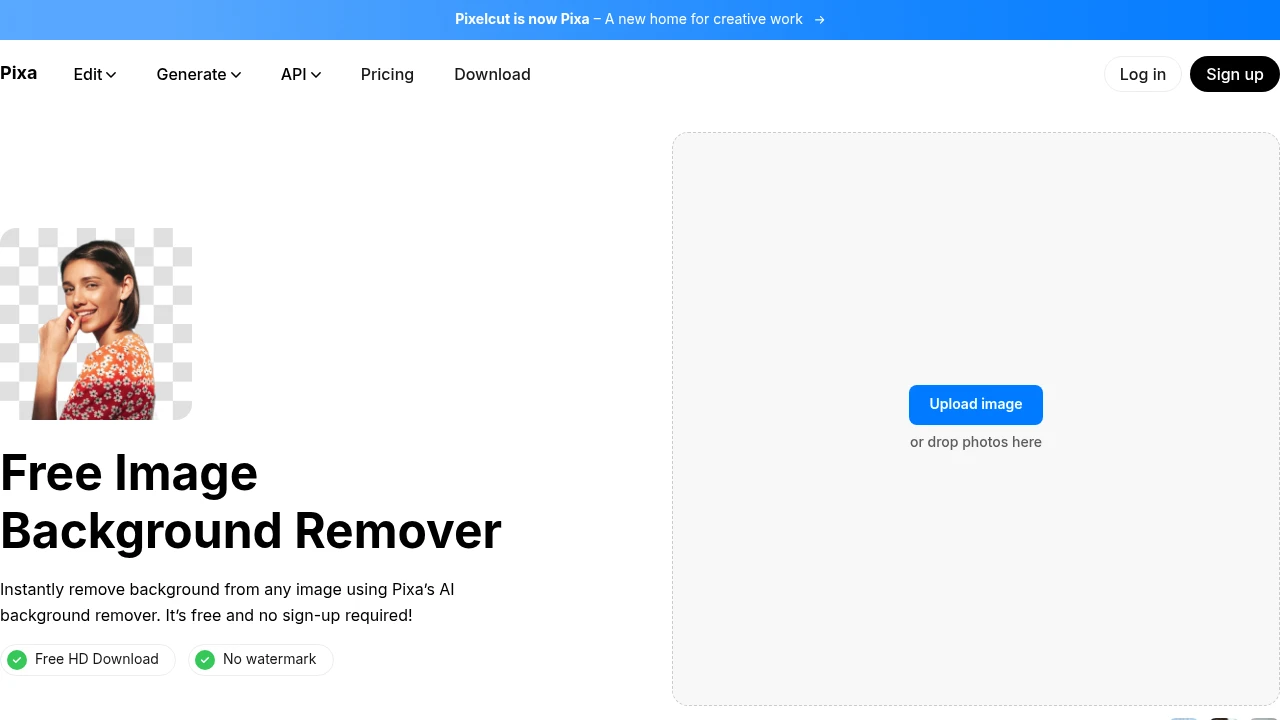
Why it ranks here: Pixelcut offers large batch previews, consistent sizing and padding, and an API option. A paid plan may still limit how many results can be downloaded each month.
Verified strengths: Pixelcut supports a no-signup browser remover, transparent PNG output, white-background options, refinement, mobile tools, bulk previews, ZIP delivery, and an API path.
Meaningful limitations: A batch can process up to 10,000 images, but the paid plan may limit how many results can be downloaded each month. API use requires separate access.
Access and pricing: Plans start at $10/month. See official documentation.
Read Pixelcut vs Background Remover for larger batch and API tradeoffs.
4. remove.bg — Best for: Teams processing desktop folders or connecting an API

Why it ranks here: remove.bg fits teams that process desktop folders or want to connect background removal to their own software through an API.
Verified strengths: remove.bg supports transparent, color, and template output, crop controls, desktop folder processing, integrations, API access, and high-resolution output.
Meaningful limitations: Full-resolution use is credit-metered, and desktop or API paths require more setup than a simple browser workflow.
Access and pricing: Official subscription and pay-as-you-go access is published; verify the current localized amount before purchase. See official documentation.
Read remove.bg vs Background Remover for desktop and API fit.
5. Claid.ai — Best for: Engineering teams automating incoming catalog images with jobs and webhooks

Why it ranks here: Claid.ai is for engineering teams that want to connect automated catalog jobs, chain image operations, and receive completion updates through webhooks. It takes more setup than a browser batch.
Verified strengths: Claid.ai supports background replacement, positioning, enhancement, resize, chained operations, batch requests, asynchronous jobs, webhooks, and catalog-oriented workflows.
Meaningful limitations: Setup requires API credentials, engineering work, monitoring, and webhook handling. Throughput also depends on the account.
Access and pricing: Self-serve plans start at $15/month. See official documentation.
Read Claid.ai vs Background Remover for asynchronous automation.
6. Removal.AI — Best for: Operators who prefer whole-folder desktop processing with pause/resume controls

Why it ranks here: Removal.AI can work well for people who process whole folders and need pause/resume controls. Buyers should confirm current pricing and output details directly before choosing it.
Verified strengths: Removal.AI supports whole-folder desktop processing, pause/resume controls, crop, ecommerce background choices, API inputs, and high-volume workflows.
Meaningful limitations: The reviewed pricing page did not reliably show current prices, so check the cost directly before purchase.
Access and pricing: Official subscription and credit-pack access is published; verify the current amount before budgeting. See official documentation.
Read Removal.AI vs Background Remover for folder operations.
How to Choose
Choose Background Remover when batches are up to 50 files and your team wants a visible browser queue, practical output choices, ZIP delivery, and predictable monthly allowances.
Choose Photoroom when no-code product editing and larger paid export allowances matter. Choose Pixelcut when large previews, consistent sizing and padding, or a later API path matter. Choose remove.bg for desktop folders or API access, Claid.ai for engineering-led automated jobs, and Removal.AI when pause/resume folder operations are the priority.
Before committing to a large run, verify batch capacity, per-file status, retry behavior, output naming, ZIP or API delivery, credit charging on failures, and the commercial terms for the plan you will actually use.
FAQ
What is the best bulk background remover?
For small and medium teams that want a straightforward browser batch, Background Remover ranks first at 8.0 because it prioritizes simple completion, shared output handling, and clear pricing and usage limits. Photoroom is the strongest broader no-code option, while Claid.ai is better when an engineering team needs automated jobs and webhooks.
Which tool has the largest batch capacity?
Pixelcut documents processing up to 10,000 images in one batch, but its paid monthly downloadable allowance is lower. Larger capacity is useful only when the export, review, retry, and pricing model also fit the job.
Do bulk tools provide ZIP downloads?
Background Remover and Pixelcut document ZIP delivery, while other tools may use desktop folders, API results, or platform-specific exports. Confirm the final delivery format before starting a production batch.
How should I compare per-image pricing?
Compare how many images a tool can process with how many finished results the plan lets you download. Also check credits, retries, failed-file charges, and whether the plan includes the output formats you need.
What should I test before processing a large batch?
Start with a small group that reflects your usual image mix. Check upload speed, per-file status, difficult edges, failed-file handling, output naming, ZIP or API delivery, and whether retries use additional credits.
Sources
- Claid.ai official API workflows
- Photoroom official pricing and batch allowances
- remove.bg official desktop settings documentation
- Pixelcut official pricing and batch allowances
- Removal.AI official desktop application
- Photoroom export-limit documentation
- Pixelcut bulk background remover
- Background Remover official bulk workflow
- Claid.ai: background removal API, plans, credit and price documentation
- Photoroom: batch remover, multi-image update
- Pixelcut: removal API, API access guide
- remove.bg: API, desktop access, plans
- Removal.AI: API documentation, plans
- Background Remover: bulk product page
- Background Remover product: public remover
Try Background Remover Today
Remove 50 backgrounds each month for $5.
Related Posts
Continue reading our latest insights
Comparison9 min read
Best Background Remover Tools in 2026
Compare six background remover tools, led by Background Remover for focused browser work and predictable allowances, with editors and APIs also covered.
Read more
Comparison9 min read
Best Background Removers for Ecommerce in 2026
Compare ecommerce removers, led by Background Remover for focused listing preparation, clear commercial access, and repeatable modest-catalog seller tasks.
Read more
Comparison9 min read
Best Background Removers for Product Photos in 2026
Compare six product-photo removers, led by Background Remover for focused listing preparation, practical output choices, and repeatable use for sellers.
Read more