#fotor background remover#fotor vs background remover#fotor alternative#fotor pricing
Quick Verdict: Fotor is an established photo editing platform since 2012 offering 100+ AI tools, 100,000+ design templates, video background removal, and cross-platform apps (web, desktop, mobile) with background removal starting at $3.99/mo (annual). It's a strong choice for creators who want an all-in-one creative suite at an affordable price. Background Remover delivers superior edge quality as a focused specialist at $5/mo with batch processing. Choose Fotor if you need design templates, video editing, or want the cheapest access to multiple AI tools. Choose Background Remover if background removal is your primary need and you want the best quality without navigating a complex feature set.
Our Ratings
Metric
Fotor
Background Remover
Overall
⭐ 4/5
⭐ 4.6/5
Edge Quality
⭐ 3.9/5
⭐ 4.5/5
Speed
⭐ 4.2/5
⭐ 4.5/5
Value
⭐ 4/5
⭐ 4.9/5
Ease of Use
⭐ 4.5/5
⭐ 4.8/5
Quick Comparison
Feature
Fotor
Background Remover
Starting Price
$3.99/mo
$5/mo
Free Tier
Yes
Yes
API Access
✅ Yes
❌ No
Mobile App
✅ Yes
❌ No
Technical Specifications
Specification
Fotor
Background Remover
Max File Size
60MB (compressed to 20MB if 20-60MB)
10MB
Input Formats
JPG, JPEG, PNG, SVG
JPG, PNG, WEBP
Output Format
JPG, PNG, PDF
PNG
No Account Needed
—
✅ Yes
Hands-On Background Removal Test
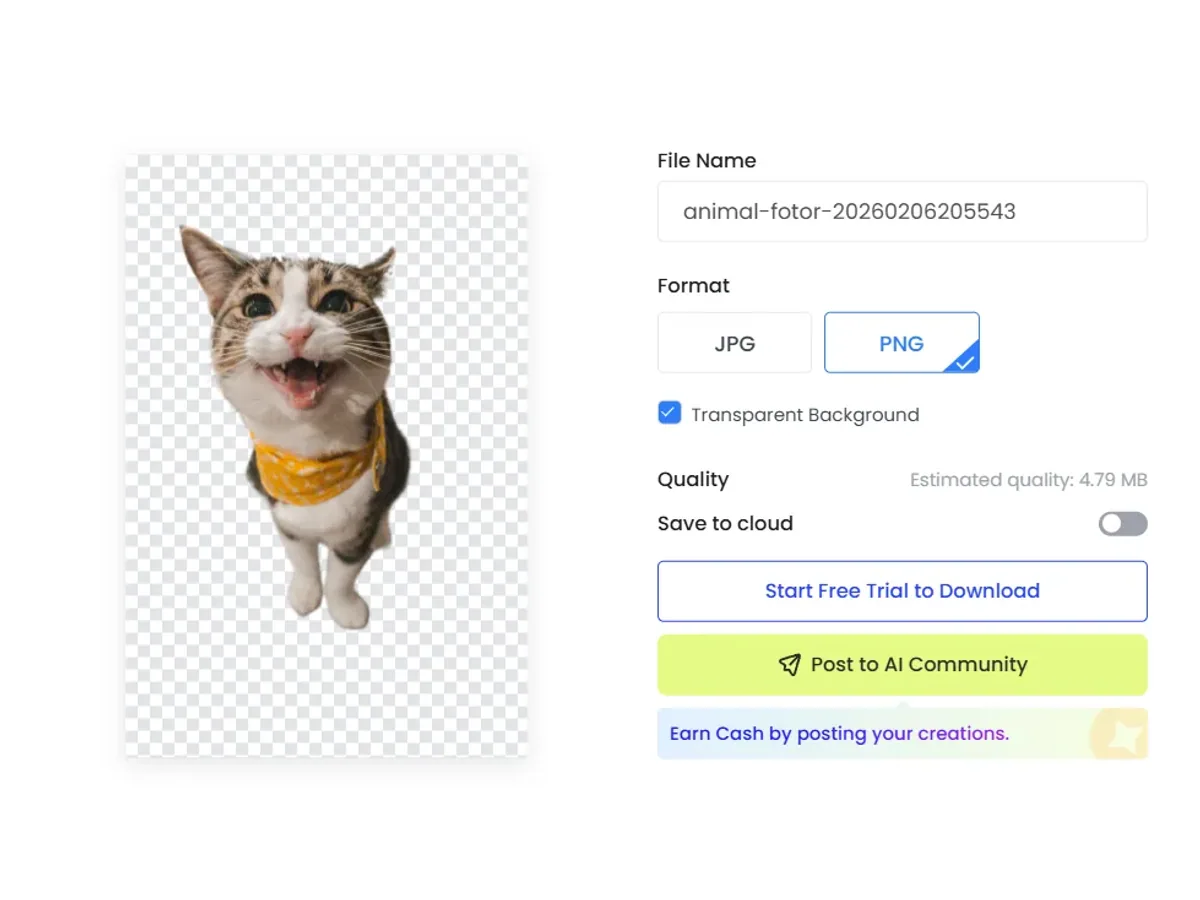
We tested Fotor and BackgroundRemover.com using the same animal image to compare the background removal results directly. We compared the finished cutouts for edge quality, leftover background, and whether each result was ready to use.
Original test image
BackgroundRemover.com result
Fotor result
Fotor had only a limited animal sample in the benchmark set, so this section should be read as a first-pass hands-on check rather than a complete review.
What we looked for: clean subject separation, natural edges, preserved details, and whether any original background remained around the subject. BackgroundRemover.com returned a focused cutout that was ready to use without opening a larger design editor. The Fotor sample was usable as a returned preview, but the limited evidence makes it harder to judge consistency across product and portrait images.
Practical winner: BackgroundRemover.com is easier to validate for repeated background removal because the workflow is narrower. Fotor can be useful inside its larger editing suite.
About Fotor
Fotor is an all-in-one photo editing platform launched in 2012 by Everimaging. The platform has evolved from a simple photo editor into a comprehensive AI-powered creative suite trusted by millions worldwide. Available on web, Windows, Mac, and mobile devices.
Key Features
100+ AI Tools: Background removal, AI enhancer, object remover, face retouching, and more
Design Templates: 100,000+ templates and assets for social media, marketing, and more
Batch Editing: Process multiple images at once (Pro+ and above)
Video Support: Video background removal, enhancer, and editing tools
API Access: Developer API available for integration
Cross-Platform: Web, desktop (Windows/Mac), and mobile (iOS/Android)
Pricing Comparison (Updated May 2026)
Fotor Pricing
Plan
Price (Annual)
Credits
Basic
Free
Limited free credits, watermarked
Pro
$3.99/mo
1200
Pro
$3.99/mo
1200
Max
$13.99/mo
12000
Background Remover Pricing
Plan
Price
Credits
Per Image
Starter
$5/mo
50
$0.10
Pro
$25/mo
250
$0.10
Ultra
$100/mo
1000
$0.10
💡 Key Insight: Background Remover offers better value with plans starting at $5/mo for 50 images. Compare pricing carefully based on your monthly volume needs.
Choose Fotor If:
✅ You're a budget-conscious creator who needs multiple AI tools: At $3.99/mo (annual), Fotor bundles background removal with 100+ AI tools (enhancer, object remover, face retouching)—the cheapest entry point for an all-in-one creative suite
✅ You're a small business owner creating marketing materials: 100,000+ templates for social media posts, flyers, and ads mean you can remove backgrounds AND design the final output in one workflow
✅ You're a mobile-first creator working across devices: Fotor's iOS/Android apps sync with web—start a project on your phone, finish on desktop, with background removal available on all platforms
✅ You're a video content creator needing background removal for both stills and video: Fotor offers video background removal alongside image tools—process product photos AND demo video clips in one subscription
✅ You're a casual user who wants API access for automation: Fotor offers developer API integration, letting you build background removal into your workflow programmatically at the $3.99/mo price point
Choose Background Remover If:
✅ You're a professional photographer who prioritizes edge quality: Background Remover's dedicated AI produces cleaner edges on hair, fur, and semi-transparent subjects—critical for professional product shots
✅ You're processing 50-100 images monthly and want predictable costs: $5/mo for 50 images with clear per-image pricing beats Fotor's credit system where 1200 annual credits must be rationed across all features
✅ You're a studio with existing editing software: You use Lightroom, Capture One, or Photoshop—you just need fast background removal without learning a new design platform
✅ You're a high-volume e-commerce seller who needs true batch processing: Upload 50+ images at once for consistent white backgrounds—Fotor's batch is limited to Pro+ plans and shares credits with other features
✅ You're a minimalist who hates feature bloat: Background Remover does one thing exceptionally well, with a clean interface and straightforward pricing—no hunting through 100+ tools to find what you need
Pros & Cons
Fotor
Pros:
All-in-one editing suite
Affordable Pro plan
Good mobile app
Design templates included
Batch processing
Cons:
Background removal requires Pro
Edge quality average
No API
Ads on free version
Background Remover
Pros:
Best value for high-volume teams
Clean, modern interface
Fast processing (5 seconds)
Reliable batch processing
Straightforward pricing
Cons:
No mobile app yet
No API access
Desktop-focused workflow
FAQ
Is Fotor background remover free?
Fotor's background remover has limited free use with watermarked exports. Full access requires Pro at $3.99/month (annual billing).
Is Fotor good for background removal?
Fotor is decent for casual use. For professional results, dedicated tools like Background Remover are better.
How does Fotor compare to Background Remover?
Fotor is an all-in-one editor. Background Remover specializes in removal with better quality and value.